Update - PPT-to-Flash Converter
Overview
Technical walkthrough
Documentation
Licensing/ License
Pricing/ Purchase
Downloads
Testimonials
Support

13.05.2009
New! The brand new
VoIP EVO SDK v3.0 PocketPC Edition is released! It comes with Unicode support, Improved AGC (auto gain controller), Ignore audio, private text messages and channel text messages features and updated examples with source code. Try it today!

12.05.2009
New! The brand new
VoIP EVO SDK v3.0
is released! The most important new feature is the ability for the admin to record conversations to files. The admin can now also stream .wav files to clients. Volume levels can now be controlled by AGC (automatic gain control) so all users have the same audio level. Try it today!

15.04.2009
New! The brand new
SlideShow SDK v1.5
is released! It comes with improved License Engine
and additional ASP.NET example. Try it today!

24.03.2009
New! The VideoMail SDK
is released! Brand new from the conaito labs comes the latest revolution in browser applications, a Webcam and Audio recorder that lets your users record video and audio directly on your site to save and play back any way they wish!
Try it today!


If you have any questions, need information, have suggestions or need help with conaito SDK, then please click here:
conaito Support Team

Crystal clear sound even for both low and high-bandwidth? Free VoIP telephony for low pricing? Windows and Linux Server support? Then you really should decide on
conaito VoIP EVO SDK!

Let´s start!
Sign up! It´s free
Download FREE Trial version
Need help? Contact us
The conaito VoIP EVO SDK contains a high performance VoIP conferencing client capable of delivering crystal clear sound even for both low and high-bandwidth users. conaito VoIP EVO users are arranged in a tree-structure where each node is a room/channel where users can talk, send instant messages and share files. More than 40 users can be in each room/channel and participate in a conference while resource usage, both memory-wise and CPU-wise, is still kept at an acceptable level for gaming and other types of resource intensive tasks.
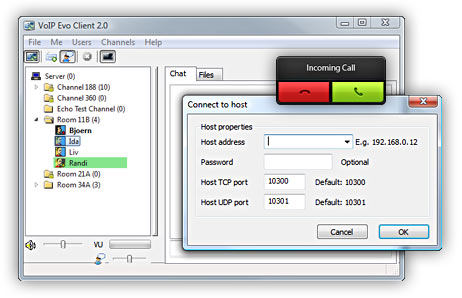
The SDK enables a worldwide communication over the internet or intern networks either by speaking and/or by text messages.

 Key features (VoIP EVO SDK - Standard and Secure Edition) nach oben


The new Version 3.0 comes now with:


The most important new feature is the ability for the admin to record conversations to files (Enterprise Edition). The admin can now also stream .wav files to clients (Enterprise Edition). Volume levels can now be controlled by AGC (automatic gain control) so all users have the same audio level.

New! Switched to Unicode clients
New! Improved AGC (auto gain controller) - to ensure all users have the same volume
New! Record VoIP conferences to WAV and MP3 (Enterprise Edition)
New! Admin can store all conversations to disk (wav or mp3) (Enterprise Edition)
New! Play (Stream) WAV to conferences - for IVR solutions (Enterprise Edition)
New! Added ability to do stereo playback
New! Ignore audio, private text messages and channel text messages
New! Fully updated examples with source code

VoIP conferencing with crystal clear sound even for both low and high-bandwidth users (Speex Codec)
Full Duplex - VoIP conferencing solution (multi-user conferences)
• Comes with Windows as well Linux server (running as service).
• Work with DirectSound as well with Windows Audio.
Multiple-Instances support (It's now possible to instantiate multiple objects of the    COM, OCX and DLL client and admins. Now you can connect to multiple conaito Evo    Servers.)
Clients can see users in other channels (It's now possible to develop a Messenger    like solution.)
Access to the raw audio data (It's The raw audio data can e.g. be encoded to a    different format and stored to disk. Also consider using the VoiceLog library included with    this SDK to mix audio from multiple users talking at the same time.)
NReinitialize sound system while connected (Restart the sound system without    disconnecting from the server.)
"Message of the Day" can now be configured with variable information (Use e.g.    %users% in the MOTD to see number of users in the server's config.)
• Remote console server administration (e.g. use telnet to control the server)
Cryptography (SSL for TCP data transmission and BLOW FISH for UDP data   transmission) is used for Encryption/Decryption (only by Secure Edition).
• Arrange users in rooms/channels with topics and passwords.
Full rooms/channels control including protection.
• User status control (participant available, away) including status messages.
• Get user talking function - Check whether a user is talking.
Private and public instant text messaging.
• Broadcast server messages - sending text messages from server to all connected users.
• Channel Messages as well Message of the Day support.
File Transfer - Share files among users in the same channel.
• Ban/ Un-Ban/ Kick Clients as well as set Client connection number limits.
• Set Clients to Operator or Administrator for different rights.
• Listing of participants and rooms/channels.
Push-to-talk (set Keyboard shortcuts) to enable voice transmission.
VAD (Voice Activity Detection) to enable voice transmission.
Denoising - Noise reduction of outgoing audio
AGC (auto gain controller) - gaining of outgoing audio by set the voice gain level.
Position users using 3D sound.
• Microphone and Speaker Volume with Mute support.
• Microphone and Speaker Visualization support
Individual volume for each user including Mute all.
• Mic Boost - more Microphone sensitivity
• 8 KHz, 16 KHz and 32 KHz voice recording each with multiple voice quality levels.
• Throughput between approx. 600 to 6000 bytes/sec. depending on voice quality.
• Packet loss resistant.
• Build-In Auto Voice Lag Controller
• Bound Data Control (Data flow control)
• NAT (Router) & Firewall friendly
• Works with all kinds of Internet connections
Royalty free licensing
No Yearly/Monthly fee
• Very easy to incorporate
• Comes with VoIP EVO Live Demo (Client and Admin) to demonstrate all the features
• VoIP EVO Client Web-based example demonstration is included

… and much more!

Get more technical information:  Technical walkthrough

Having the above features available makes it simple to develop any type of VoIP-enabled application, like e.g. a teaching tool, live support, chat, meeting tool, a multiplayer game or any other type of application which requires users being able to talk, type messages and send files to each other. For conaito VoIP EVO clients to be able to interact with each other they must connect to a conaito VoIP EVO server which keeps track of where users are located and forwards voice-data packets between clients. The conaito VoIP EVO server can be hosted in both LAN and internet environments.

Please, don't hesitate trying our VoIP EVO SDK at once and get yourself, as well as your customers, the exciting experience of easy, fast and high quality standard applications which VoIP-enable your application.

We hope you enjoy the new conaito VoIP EVO SDK – A simple way to VoIP-enable your applications and Websites.


 The contents of conaito VoIP EVO SDK and the supported development  environments include: nach oben


The conaito VoIP EVO SDK provides the documentation, samples and related libraries you need to integrate with other applications or systems. Conaito VoIP EVO SDK also includes a Win32 DLL with a C-interface, a Win32 COM control and a Win32 OCX that can be used from any programming language like C++, Visual Basic, Delphi, ASP, JSP, PHP, JavaScript, VBScript, etc.

The contents of conaito VoIP EVO SDK and the supported development environments include all of the necessary software components for building systems based on conaito VoIP EVO SDK including documented operational software applications, examples (with source code), explanations as well as necessary service programs, libraries and components.

The supported development environments include:

• Visual Basic .NET
• Visual C++ .NET
• Visual C# .NET
• ASP.NET
• ASP, JSP, PHP
• JavaScript/HTML
• Visual Basic
• Visual C++
• Borland Delphi
• and all development environments with Win32 DLL with a C-interface, a Win32 COM control and a Win32 OCX support

Server system requirements:
Operating system: Windows, Linux

Any Questions?

Our Support Forum or Knowledgebase/ Helpdesk is the best way for your questions.
Please feel free to contact the conaito Support Team incase of any question.


The conaito VoIP EVO SDK has received Awards from well-known Download and Shareware sites including Five Star and Editor Choice Awards!